Build a Multilingual Local Voice Journal App with FastAPI and Whisper (Beginner Guide)
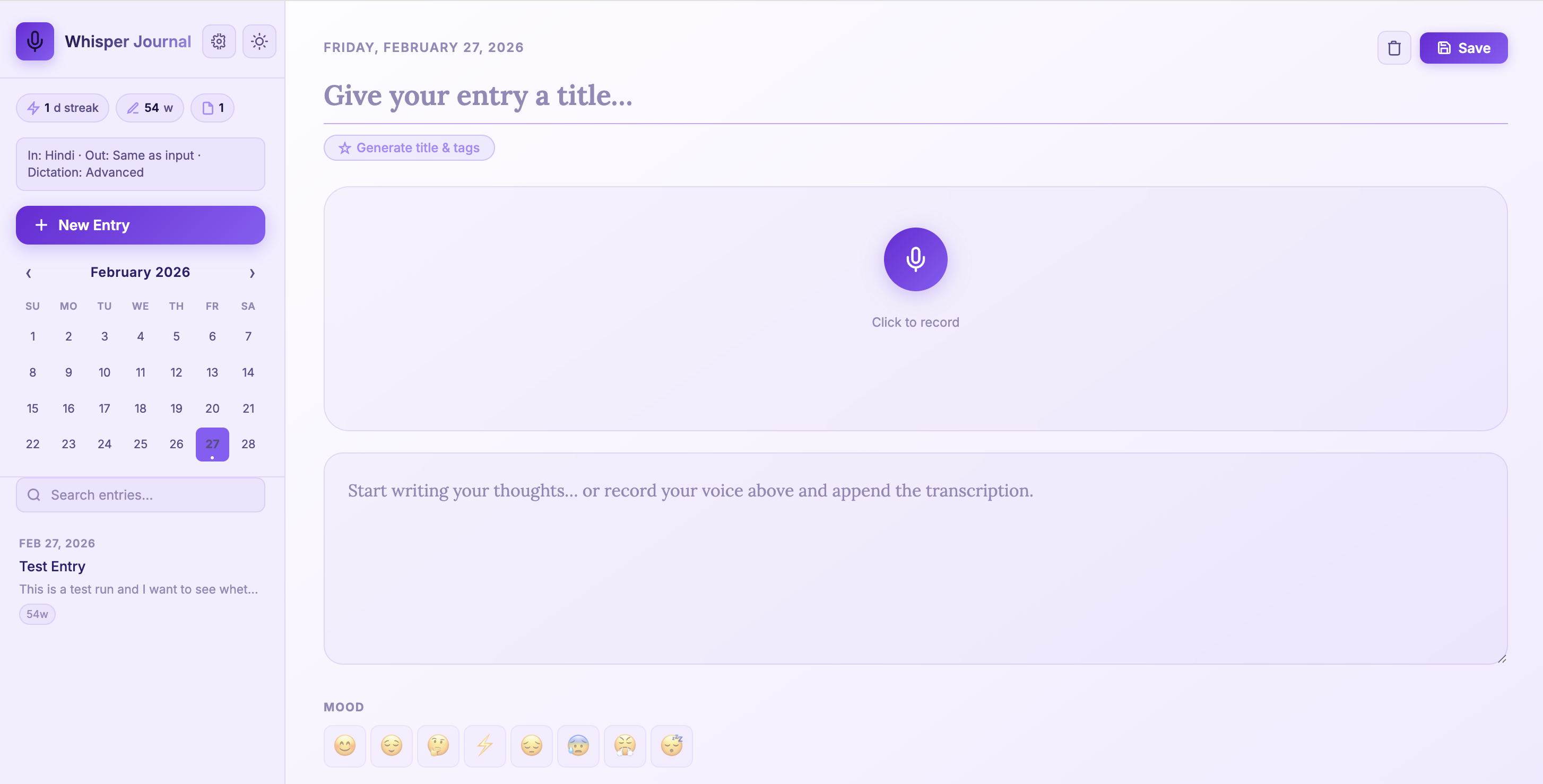
Thoughts come faster than typing. That single friction point is why I built Whisper Journal — a voice-first journaling app where you speak, and your words land as searchable text on your own machine. In this post I walk through it, beginner by beginner, and by the end you’ll have run it locally and understood how every piece fits together.
Repository: whisper-jouraling-app
The one mental model
Whisper Journal is local-first. Your voice never leaves your laptop: the browser records audio, a FastAPI backend transcribes it with a local Whisper model, and the text is saved to a local SQLite file. No cloud, no account, no upload.
mic → browser recorder → FastAPI → local Whisper → SQLite → searchable journal
The app itself includes multilingual dictation (en, hi, zh), three dictation-quality levels
(basic, enhanced, advanced), AI-assisted title/tag generation, a settings UI, and better
microphone-permission handling on macOS.
Why build a voice journal?
The problem is friction. A voice journal lowers it, which is why apps like this stick:
- Capture ideas while walking, commuting, or cooking — no keyboard needed.
- Keep private notes local instead of handing them to a cloud service.
- Support multilingual thinking (switch between English and Hindi naturally).
- Turn unstructured voice notes into searchable text.
And from a learning perspective, this one small app touches five skills at once: browser media APIs, backend API design, local AI model inference, persistent storage, and the UX tradeoffs between privacy, speed, and accuracy. That breadth is exactly what makes it a good teaching project.
What you need before you start
- Python
3.10+ ffmpeg(required by Whisper)- Git
- A microphone
On macOS:
brew install ffmpeg
Gotcha: Whisper shells out to ffmpeg to decode audio. If it isn’t on your PATH, transcription
fails with an obscure error even though your Python install looks fine. Install ffmpeg first.
Step 1: Clone and install
git clone https://github.com/earthinversion/whisper-jouraling-app.git
cd whisper-jouraling-app
make install
What make install does:
- Creates
.venv - Upgrades
pip - Installs dependencies from
requirements.txt - Creates
data/uploadsdirectory for images
The main dependencies are small and purposeful: fastapi (API + web routes), uvicorn[standard]
(ASGI server), openai-whisper (local transcription), python-multipart (file uploads), jinja2
(server-rendered HTML), and yake (local keyword extraction).
Step 2: Run the app
make run
Then open:
http://127.0.0.1:8000
Useful commands during development:
make dev     # foreground + auto-reload
make status  # check running state
make logs    # tail app log
make stop    # stop background server
When you dictate an entry, where does the speech-to-text actually happen?
Project structure
whisper-jouraling-app/
├── main.py               # FastAPI app, Whisper + metadata + SQLite logic
├── templates/index.html  # Main UI + settings view
├── static/js/app.js      # Client logic (recording, settings, metadata actions)
├── static/css/style.css  # Styling and theme behavior
├── data/                 # Local database and uploaded images
├── Makefile              # Install/run/dev lifecycle commands
└── requirements.txt      # Python dependencies
This layout stays beginner-friendly because the backend and frontend logic live in two clear files:
main.py and static/js/app.js. Everything below is just those two files, explained.
Backend walkthrough
FastAPI + storage setup
main.py initializes directories, static file mounts, templates, and the SQLite path:
app = FastAPI(title="Whisper Journal")
BASE_DIR = Path(__file__).parent
DATA_DIR = BASE_DIR / "data"
UPLOADS_DIR = DATA_DIR / "uploads"
DB_PATH = DATA_DIR / "journal.db"
Whisper model selection by dictation level
Instead of one fixed model, the app maps each dictation level to a Whisper model — bigger models are more accurate but slower:
DICTATION_LEVEL_TO_MODEL = {
    "basic": "base",
    "enhanced": "small",
    "advanced": "medium",
}
It also enforces language-specific minimums for better accuracy: Hindi uses at least medium, and
Chinese uses at least small. That’s a small but practical improvement for multilingual journaling —
the languages that are harder for smaller models get bumped up automatically.
What is the tradeoff when you choose the advanced dictation level (the medium model)?
The transcription endpoint accepts settings
/api/transcribe receives the audio plus the user’s language and quality choices:
audiolanguageoutput_languagedictation_level
@app.post("/api/transcribe")
async def transcribe(
    audio: UploadFile = File(...),
    language: Optional[str] = Form(None),
    output_language: Optional[str] = Form(None),
    dictation_level: Optional[str] = Form(None),
):
The important behavior inside this route: it validates supported languages and dictation levels, applies language prompts (for punctuation style), uses translation only where Whisper supports it (to English), and adds post-processing punctuation for Hindi when needed.
Metadata generation endpoint
The endpoint POST /api/generate-metadata creates a title and tags from the entry content, with a
graceful fallback:
- Try local
ollama(llama3.2:1b) if available. - Fall back to local extraction (
_extract_title+ YAKE/frequency).
This gives good quality when ollama is running, while still working fully offline without it — a clean example of progressive enhancement on the backend.
SQLite schema (unchanged core design)
The app stores entries in a single table with metadata:
CREATE TABLE IF NOT EXISTS entries (
    id          INTEGER PRIMARY KEY AUTOINCREMENT,
    title       TEXT    DEFAULT '',
    content     TEXT    DEFAULT '',
    date        TEXT    NOT NULL,
    created_at  TEXT    NOT NULL,
    updated_at  TEXT    NOT NULL,
    mood        TEXT    DEFAULT '',
    tags        TEXT    DEFAULT '[]',
    images      TEXT    DEFAULT '[]',
    word_count  INTEGER DEFAULT 0
)
This is a solid beginner schema — tags and images are stored as JSON strings in a single table before you ever need to reach for a multi-table design.
Frontend walkthrough
The frontend is still vanilla JavaScript in one file, now with a settings panel and metadata actions.
Settings-driven transcription. User settings live in localStorage (wj-settings) and are
applied to each transcription request: input language (en/hi/zh), output language
(same/en/hi/zh), and dictation level (basic/enhanced/advanced).
Recording flow. Recording uses three standard browser pieces:
navigator.mediaDevices.getUserMedia({ audio: true })MediaRecorderFormDataupload to/api/transcribe
The payload now carries the language and dictation settings in the same request.
Generate title and tags. Clicking Generate title & tags calls POST /api/generate-metadata,
fills an empty title, and appends non-duplicate tags. The journal works fine without this button —
it just becomes faster to use with it.
End-to-end data flow
Microphone
  -> MediaRecorder (browser)
  -> settings-enriched FormData (language/output/dictation level)
  -> /api/transcribe (FastAPI)
  -> language-aware Whisper model selection
  -> transcription text
  -> /api/entries
  -> SQLite (data/journal.db)
  -> UI render (list, calendar, stats)
The metadata flow, and 10 ideas to build next
The title/tag generation follows its own short path:
Journal content
  -> /api/generate-metadata
  -> try local ollama (if available)
  -> fallback to YAKE/local extraction
  -> title + tags returned
  -> prefill editor fields
Once the basics work, here are creative directions to evolve it:
- Dream-to-design log — capture dream fragments after waking, then auto-cluster recurring symbols and themes.
- Scientist field companion — voice notes + images + GPS metadata for real-world observation journals.
- Memory atlas — convert entries into a personal map of places, events, and emotional tone over time.
- Emotional weather dashboard — visualize mood streaks as seasonal trends and trigger reflective prompts.
- Conversation rehearsal coach — practice interviews or talks, then tag filler words and confidence phrases.
- Family story archive — record elders’ stories, auto-tag people/locations, and build a searchable oral-history timeline.
- Research scratchpad — convert lab or coding voice notes into dated experiment logs with keyword extraction.
- Language mirror mode — speak in Hindi/Chinese and keep aligned English summaries for study revision.
- Quiet productivity coach — detect repeated procrastination themes and suggest focused next actions.
- Creative writer’s seed vault — store fragments of scenes, dialogue, and plot hooks, then surface related ideas automatically.
API reference
| Route | Method | Purpose |
|---|---|---|
/api/transcribe |
POST |
Audio transcription with language and dictation controls |
/api/open-microphone-settings |
POST |
Open macOS microphone settings page |
/api/generate-metadata |
POST |
Auto-generate title and tags |
/api/upload-image |
POST |
Save image attachments |
/api/entries |
GET/POST |
List and create entries |
/api/entries/{id} |
GET/PUT/DELETE |
Read/update/delete a single entry |
/api/stats |
GET |
Total entries, words, streak |
/api/dates |
GET |
Dates with entries for calendar highlights |
Want more accuracy or speed? openai-whisper also ships larger models like large-v3 and a
faster turbo model — you can extend DICTATION_LEVEL_TO_MODEL to use them. If transcription feels
slow on CPU, a drop-in reimplementation like faster-whisper
runs the same models several times faster.
Recap
Without scrolling up — can you trace the pipeline? Whisper Journal is:
- Local-first: audio is recorded in the browser and transcribed by a local Whisper model in a FastAPI backend; nothing goes to the cloud.
- Adaptive: the dictation level picks the Whisper model (accuracy vs. speed), with automatic minimums for Hindi and Chinese.
- Enhanced, not dependent: title/tag generation tries local ollama and falls back to YAKE, so it works fully offline.
- Simple to store: a single SQLite table holds each entry with its tags and images as JSON.
That combination — browser media APIs, a small FastAPI backend, local AI inference, and SQLite — is a compact tour of full-stack, privacy-respecting app design.
Where to go next
- The source, to run and extend: whisper-jouraling-app.
- FastAPI documentation — request handling,
Form/Fileuploads, and templates. - OpenAI Whisper — model sizes and language support.
- Ollama — running small local LLMs like
llama3.2:1bfor the metadata step.
Disclaimer of liability
The information provided by the Earth Inversion is made available for educational purposes only.
Whilst we endeavor to keep the information up-to-date and correct. Earth Inversion makes no representations or warranties of any kind, express or implied about the completeness, accuracy, reliability, suitability or availability with respect to the website or the information, products, services or related graphics content on the website for any purpose.
UNDER NO CIRCUMSTANCE SHALL WE HAVE ANY LIABILITY TO YOU FOR ANY LOSS OR DAMAGE OF ANY KIND INCURRED AS A RESULT OF THE USE OF THE SITE OR RELIANCE ON ANY INFORMATION PROVIDED ON THE SITE. ANY RELIANCE YOU PLACED ON SUCH MATERIAL IS THEREFORE STRICTLY AT YOUR OWN RISK.
Leave a comment